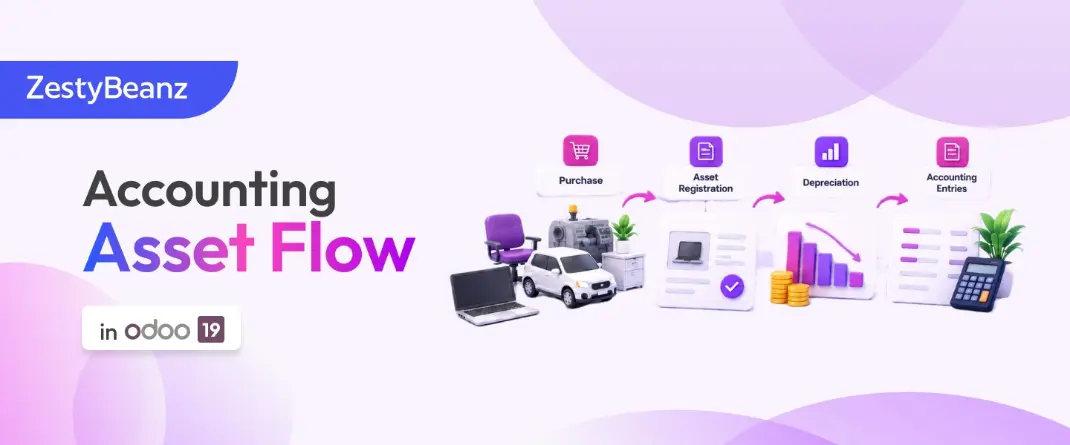
Odoo 19 – Accounting Asset Flow
Odoo 19 – Accounting Asset Flow
1. Introduction
An asset is something valuable that a company owns and uses for business purposes.
Examples:
Laptop
Vehicle
Machinery
Office furniture
Equipment
Building
When a company purchases an asset, the full cost is not always treated as an expense immediately. If the asset is expected to be used for several years, its cost can be recognized gradually through depreciation.
Example
A company purchases a laptop for BHD 600 and expects to use it for 3 years.
Instead of recording:
BHD 600 = Expense immediately
the company records:
BHD 600 = Asset
The BHD 600 is then gradually recognized as depreciation expense over the asset’s useful life.
2. Asset Flow
The basic accounting asset flow is:
Asset Model
↓
Vendor Bill
↓
Asset
↓
Depreciation Board
↓
Depreciation Journal Entry
↓
Depreciation Expense
In simple terms:
Purchase the asset → Record the asset → Define depreciation rules → Calculate depreciation → Post depreciation entries.
3. Asset Model
An Asset Model defines the rules that Odoo should use when depreciating an asset.
Go to:
Accounting → Configuration → Asset Models
An Asset Model can define:
Depreciation method
Duration
Number of depreciations
Depreciation frequency
Accounting accounts

Click the Create button and Odoo will lead you to a new configuration window as shown in the screenshot below.

In the Asset Model Name field, you can provide a name for the asset model. You can set the Depreciation Method as a Straight Line, Declining, or Declining then Straight Line.
Depreciation Methods
Method | Simple Meaning | Example / Behavior |
Straight Line | Same depreciation amount in each period. | ₹60,000 over 3 years → about ₹20,000 per year. |
Declining Balance | Higher depreciation initially, then lower amounts. | A percentage is applied to the remaining book value. |
Declining then Straight Line | Starts with declining balance and later switches to straight line when appropriate. | Combines faster early depreciation with stable later depreciation. |
Duration: Number of depreciation periods required.
Computation: Method used to calculate depreciation — No Prorata, Constant Periods, or Based on Days per Period.
Company: Company to which the asset model belongs.
Fixed Asset Account: Records the original asset purchase value.
Depreciation Account: Records the decrease in asset value.
Expense Account: Records depreciation as an expense for each period.
Journal: Journal where the asset accounting entries are recorded.
Example
Asset Model: Office Equipment
Depreciation Method: Straight Line
Duration: 3 Years
Frequency: Monthly
In order to automate the assets, you can go to the Configuration menu and select the Chart of Accounts.


Create in draft → Odoo automatically creates the asset, but the asset remains in Draft state.
Create and Validate → Odoo creates the asset and immediately validates it.
Do Nothing → No asset is created automatically.
4. Vendor Bill
Now let’s take a look at how to create a record of assets in Odoo. First, generate a vendor bill for the purchased asset. While generating the vendor bill, make sure to select the account as the same as that of the asset model.
Suppose the company purchases a laptop from a vendor.
Go to:
Accounting → Vendors → Bills → New
Enter:
Vendor: ABC Computer
Product: Laptop
Quantity: 1
Price: BHD 600
The vendor bill total is:
BHD 600
The purchase account/configuration should be set up so that Odoo can treat the purchase as an asset.

Once you validate this vendor bill, you will get the Asset smart button on the screen as shown below.

5. Post the Vendor Bill
After entering the required information, post the vendor bill.
The accounting entry is conceptually:
Debit Office Equipment BHD 600
Credit Accounts Payable BHD 600
What does this mean?
Debit – Office Equipment
The company now owns an asset worth BHD 600.
Credit – Accounts Payable
The company owes BHD 600 to the vendor.
At this point:
Asset owned by company = BHD 600
Amount payable to vendor = BHD 600
6. Asset Record
After the purchase is configured as an asset, Odoo creates or allows the corresponding asset record.
Go to:
Accounting → Accounting → Assets
The asset contains information such as:
Asset: Laptop
Original Value: BHD 600
Depreciation Method: Straight Line
Duration: 3 Years
Frequency: Monthly
The asset record represents the item/value owned by the company.

You can manually configure a new asset in your system by using the Create button. The new configuration window appears on your screen as shown below.

The bills related to this asset can be added one by one using the Add a Line button under the Bills tab.
In the Depreciation Method and Accounting sections, the details will be auto-populated based on the asset model you select.

7. Depreciation
What is depreciation?
Depreciation means gradually recognizing the cost of an asset as an expense over its useful life.
For example:
Asset Cost = BHD 600
Useful Life = 3 Years
3 years = 36 months.
Therefore:
600 ÷ 36 = BHD 16.67 approximately per month
So approximately BHD 16.67 is recognized as depreciation each month.

You can click on the Confirm button to confirm the asset. Using the Compute Depreciation button, you can calculate the depreciation and it will be available under the Depreciation Board tab
8. Depreciation Board

The Depreciation Board shows the planned depreciation schedule for the asset.
The depreciation board helps the user understand:
When depreciation should happen
How much depreciation should be recorded
How much depreciation has already been recorded
The remaining value of the asset